
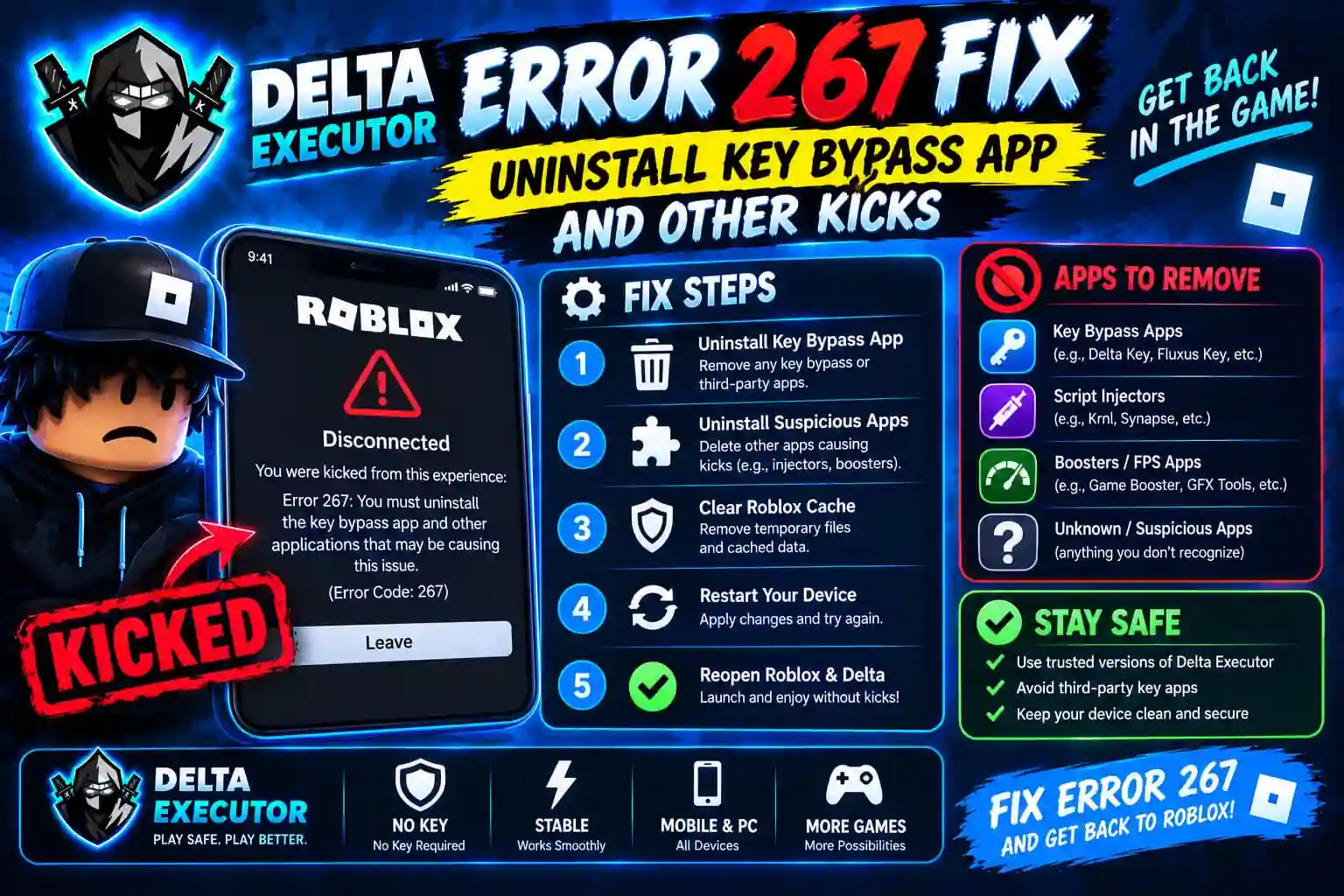
Error 267 Fix: Uninstall Key Bypass App and Other Kicks
Error 267 feels different from most Roblox errors because the game tells you exactly why. Sometimes the message says “Uninstall key bypass app.” Other times it says you were idle too long, or that you broke a rule, or that an admin removed you. Every one of these is a game-side kick, meaning the Roblox game itself (not Roblox the company) decided you should not stay in the server. That is why Error 267 fixes differ wildly from Error 268 fixes. This guide covers every version of Error 267, including the recent “key bypass app” message that trips up executor users, with step-by-step fixes for Windows, Mac, Android, and iOS.
What Error Code 267 Actually Means
Error 267 is a game-side kick. That one word, “game-side,” is the key to understanding it. The game you were playing (Blox Fruits, Grow a Garden, 99 Nights in the Forest, Rivals, or any other) decided to remove you from its server. Roblox the platform did not do this. Roblox just displayed the message.
The full error message usually looks like one of these:
The reason in brackets is set by the game developer. Each game can define its own kick reasons and triggers. Some games use anti-cheat libraries that detect executors. Some use idle timers. Some use admin commands. All of them show up as Error 267 on your screen.
Important: Error 267 is a kick, not a ban. Your Roblox account is fine. You can join a different game instantly. You just cannot stay in the specific server that kicked you until you resolve whatever triggered the kick.
Error 267 vs Error 268 (Important Difference)
These two errors confuse people constantly because they look similar on the surface. Here is the real difference, which changes how you fix them.
| Factor | Error 267 | Error 268 |
|---|---|---|
| Who kicked you | The game (its anti-cheat or script) | Roblox platform (Hyperion) |
| Reason shown | Yes, usually visible on kick screen | Generic “Unexpected Client Behavior” |
| Scope | Only the kicking game | Any game, platform-wide |
| Common causes | Game anti-cheat, idle, rules, admin | Executor, antivirus, corrupted files |
| Fix approach | Address the specific kick reason | Clean client, remove interference |
| Rejoin same game | Can rejoin after fix, but same trigger kicks again | Blocked until underlying issue fixed |
| Rejoin different game | Always works | May still fail if trigger is client-wide |
If you keep seeing Error 268 across different games, see our related Roblox error 317 guide and the full troubleshooting flow for client-side kicks.
Every Reason Error 267 Can Fire
Game developers set their own kick triggers, so Error 267 has many flavors. Here are the ones we have documented across popular Roblox games.
Uninstall key bypass app
A newer kick message that fires when the game detects certain apps on your device that bypass executor key systems or linkvertise ad walls.
Idle / AFK timeout
You stood still too long or did not interact. Games like Blox Fruits kick after 15 to 20 minutes of no input.
Script / exploit detected
The game’s anti-cheat caught a modified walkspeed, teleport, infinite jump, or similar executor-driven change.
Admin kick
A game moderator manually removed you using admin commands. Reasons vary from spam chat to breaking game rules.
Vote kick
Other players voted to remove you. Common in competitive games like Rivals and some PvP arenas.
Rule violation
You said something flagged by the game’s chat filter, used blocked language, or triggered a profanity filter twice.
Account too new
Some games refuse accounts under a few days old to combat alts. You get Error 267 at join with no other explanation.
Game-side temp ban
You were banned from this specific game (not Roblox) for prior behavior. Rejoining fires Error 267 instantly.
IP blocked by game
Some games block IPs associated with VPNs, bot farms, or alt-account networks.
Server full / closing
Rare, but some games throw Error 267 instead of a proper disconnect when the server shuts down for maintenance.
Script crash
The game’s own code hit a bug and dumped you. Not your fault. Rejoining works fine.
Network timeout mid-session
Your connection dropped briefly. The game’s handler threw a 267 instead of a cleaner disconnect code.
The “Uninstall Key Bypass App” Kick Explained
This is one of the newer and more confusing variants of Error 267, so it deserves its own section. If you are seeing a kick message that reads:
Here is what is actually happening.
What a key bypass app is
Many Roblox executors use a key system to monetize. You run the executor, it tells you to visit a link, you watch an ad or wait on linkvertise, and you get a key to paste back. This generates ad revenue for the executor’s developers.
Key bypass apps are third-party tools that skip these ad walls. They automate the linkvertise navigation and hand you the key instantly. Popular bypass apps include Delta Key Grabber clones, Linkvertise Bypass tools, and generic script-key auto-fetch Android apps.
Why games detect them
A handful of popular Roblox games now include anti-cheat snippets that look for signs of these bypass apps running on your device. On Android, they check installed package names. On iOS, they check running processes. On PC, they look for specific DLL signatures in memory. If they find one, they kick with Error 267 and the “Uninstall key bypass app” message.
Why this is new
This detection pattern started appearing in popular script-heavy games recently. Game developers are cooperating informally to share detection signatures, so once one game adds the detection, others follow within days.
Who gets this kick
You get this kick if you have ever installed a key bypass app on the same device you are playing Roblox from. The app does not even need to be running. Some detection signatures scan for app presence, not activity. That is why you can be kicked for an app you installed weeks ago and forgot about.
Delta Executor itself does not trigger this kick. The kick targets separate key-bypass apps you install alongside an executor. Keep Delta installed. Just remove whatever bypass tool you added to skip its key step. Our Delta keyless scripts guide covers which scripts need no key at all.
Fix 1: Remove Key Bypass Apps
If your Error 267 specifically mentions “Uninstall key bypass app,” this is the fix. Follow the steps for your platform.
Android
- Open Settings > Apps > All Apps. List every installed app.
- Look for suspicious bypass apps. Common names: Linkvertise Bypasser, Key Bypasser, Delta Key Grabber, Script Key Auto, Hydrogen Bypass, Script Keys Hub, and generic names with the word “bypass” or “key” in them.
- Tap each one and press Uninstall. Do not just disable; fully uninstall.
- Also check Downloads for leftover APKs. Files > Downloads folder, delete any APK with bypass or key in the name.
- Clear Roblox cache. Settings > Apps > Roblox > Storage > Clear Cache. This forces fresh detection on next launch.
- Reboot your phone. Clears residual processes.
- Launch Roblox and rejoin the game. The kick should be gone.
iOS
iOS apps are harder to disguise, so bypass apps on iOS usually come through sideloading (AltStore, Sideloadly, or TrollStore). To remove them:
- Open Settings > General > VPN & Device Management. Look for sideload profiles.
- Remove any profile that is not Apple or your corporate IT. These profiles sign third-party apps.
- Delete sideloaded bypass apps from the home screen. Tap and hold the icon, Remove App, Delete App.
- Reboot your iPhone.
- Reinstall Roblox fresh from the App Store if the kick continues.
Windows
On PC, bypass tools usually ship as a small .exe or browser extension. Remove them:
- Open Settings > Apps > Installed Apps. Look for anything with “bypass”, “key”, “linkvertise”, “autobypass”, or similar in the name.
- Uninstall each.
- Check your browser extensions. Chrome: three dots > Extensions > Manage Extensions. Firefox: menu > Add-ons. Remove anything related to key or linkvertise bypassing.
- Clear browser cache. Browser extensions often cache bypass tokens.
- Restart Windows.
- Launch Roblox and rejoin.
Fix 2: Close Your Executor Properly
If Error 267 fires with a generic “exploit detected” or “cheater kicked” message, your executor was caught by the game’s anti-cheat. The fix is to close the executor fully before launching Roblox, not just minimize it.
- Close Roblox completely through Task Manager (Windows), Activity Monitor (Mac), or force stop (mobile).
- Close your executor. For Delta, end every Delta process in Task Manager or kill the Delta app on mobile.
- Wait 30 seconds.
- Launch Roblox without the executor running. This tests whether you can play clean.
- If clean works, reattach the executor only after joining the game. Some games detect executors that attached before the game script loaded, but not after.
For deeper detection troubleshooting, read our is Delta detected guide and Delta not working breakdown.
Fix 3: Lower Your Script Visibility
If your executor is working but Error 267 keeps firing in a specific game, your scripts are too obvious. Game anti-cheats detect dramatic changes to your character or game state.
What game anti-cheats detect
- Walkspeed above 20: Default is 16. Most anti-cheats flag anything above 25.
- Jump power above 60: Default is 50. Values of 100 or more trigger kicks.
- Teleport distance: Any movement greater than 50 studs in one frame.
- Infinite jumping: More than three jumps without landing.
- Noclip: Walking through solid walls.
- Instant kills: Dealing damage without the correct animation or weapon state.
How to stay invisible
- Keep walkspeed at 20 or less. Small boost, no kick.
- Avoid noclip and fly in anti-cheat games. They are always detected.
- Use silent features over obvious ones. ESP over aimbot, auto-collect over teleport-to-item.
- Disable features between rounds. Anti-cheats sample state at specific moments.
- Use updated hub scripts. Older scripts are more detectable than fresh builds.
Our script not working guide covers detection patterns in more depth.
Fix 4: AFK and Idle Kicks
If your Error 267 message says you were idle or AFK, the game’s idle timer fired. Most Roblox games kick after 15 to 20 minutes of no input. Grinding games (Grow a Garden, Blox Fruits) often have shorter timers.
Solutions
- Use an anti-AFK script. Simulates small inputs every few minutes. Most Delta hubs include one. Our scripts hub has standalone anti-AFK scripts for every popular game.
- Enable Roblox’s own AFK prevention. Settings > Other > turn off “Device Takes a Break” if present on your platform.
- Keep the Roblox window focused. On PC, Roblox detects when you tab out and starts the idle timer immediately. On mobile, switching apps triggers the same.
- Set a small weight on your mouse. Old-school solution but works. Rests on arrow key or jump button.
Some games detect anti-AFK scripts and still kick you with Error 267. Use a randomized anti-AFK (changes input direction and timing) rather than a looped Space key spam. Random inputs look like a real distracted player.
Fix 5: Rule Violation Kicks
If Error 267 fired after you typed something in chat, the game’s filter caught a rule violation. These kicks vary by game but usually include:
- Profanity: Even bypassed with symbols, modern filters catch them.
- Links or Discord invites: Most games auto-kick for any URL.
- Hate speech: Zero-tolerance across all major games.
- Advertising executors or scripts: Especially in anti-cheat games.
- Impersonating staff: Saying “I am a moderator” or similar.
- Spam: Same message five times in a row.
The fix is simple: do not do these things. Rule violation kicks usually come with a short cooldown. Rejoin after 5 to 10 minutes. Repeated violations in the same game can escalate to a game-level ban that lasts hours or days.
Fix 6: Game-Specific Account Bans
Some games let moderators ban specific accounts from their experience. This is separate from a platform-wide Roblox ban. The affected account cannot join the specific game, but every other game works fine.
How to tell if this is your situation
- Error 267 fires immediately on join, before you can do anything.
- Switching to a different Roblox game works perfectly.
- The kick message mentions a ban reason or ban duration.
- Your friends can still play the game but you cannot.
Options
- Wait out the ban if a duration is shown. These usually last 1 hour to 7 days.
- Appeal with the game’s own support channel. Most popular games have a Discord server with an appeals form. For Delta’s community, check our Discord link.
- Use a different account to play while you wait. Keep in mind that evading bans with alts can get both accounts flagged.
- Accept the ban if you broke the rules. Appeals rarely succeed when caught cheating.
Fix 7: Network and Lag-Based Kicks
Sometimes Error 267 fires because of connection problems, not cheating. The game interprets high latency or packet loss as a sign of client tampering and kicks you.
- Test your internet speed. Below 2 Mbps or above 150ms ping often triggers 267 in competitive games.
- Restart your router. Unplug for 30 seconds, plug back in.
- Switch to a wired connection if on WiFi. Reduces jitter dramatically.
- Disable background downloads. Steam updates, cloud backups, and YouTube streams eat bandwidth.
- Try a different server. Roblox has region-based servers. Choose one closer to you.
- Disable VPN temporarily. Even if not the main cause, VPNs add latency that compounds the problem.
- Switch networks entirely. Mobile hotspot or friend’s WiFi as a test.
Platform-Specific Error 267 Steps
| Platform | Most Common Trigger | First Fix |
|---|---|---|
| Windows PC | Executor caught by game anti-cheat | Close executor, lower script visibility |
| Mac | AFK timeout or network drop | Enable anti-AFK, test connection |
| Android | Key bypass app installed | Uninstall bypass apps from Settings |
| iOS | Sideloaded bypass tool detected | Remove sideload profile, reinstall Roblox |
| Xbox / Console | Server-side game ban | Wait out the ban or appeal |
| Chromebook | Network inspection on school WiFi | Switch to mobile hotspot |
For install-related iOS problems, our Delta iOS not opening guide may help if the kick followed a sideload. On Android, if the kick happens after a Delta update, see our Delta APK installation guide.
How to Prevent Error 267 Going Forward
Once you fix the current kick, these habits keep it away.
- Keep your device clean of bypass apps. Use linkvertise directly instead of shortcut tools. Our keyless scripts list removes the need entirely.
- Use subtle script settings. Walkspeed 20, no infinite jump in anti-cheat games, silent aim over aimbot.
- Follow in-game chat rules. No links, no profanity, no spam.
- Keep an anti-AFK ready if you play grinding games overnight.
- Avoid games you have been game-banned from until the duration expires.
- Use a stable connection. Wired is best, 5GHz WiFi second, mobile data third.
- Disable VPN during gameplay unless you need regional access.
- Keep your Roblox client updated. Older clients get kicked more often by newer anti-cheats.
The Bottom Line
Error 267 is a game-side kick with many flavors. The “Uninstall key bypass app” variant is the newest and traps a lot of executor users. Remove any key bypass tool from your device, close your executor between sessions, keep script settings subtle, use an anti-AFK for long sessions, and follow game chat rules. Each kick type has its own fix, and the kick message almost always tells you which path to take.
For broader Delta troubleshooting, bookmark our Delta not working guide, scripts not working guide, and the main deltaexecutions.com hub for the latest tested Delta builds.
Frequently Asked Questions
What does Roblox Error 267 mean?
Error 267 means the game you were playing kicked you from its server. The kick comes from the game’s own code (its anti-cheat, idle timer, admin tool, or rule system), not from Roblox the platform. The kick message usually tells you the specific reason, like “Uninstall key bypass app,” “Idle too long,” or “Exploit detected.” Your Roblox account is not banned; only that session was ended.
What does “Uninstall key bypass app” mean?
This kick message means the game detected an app on your device that bypasses executor key systems or linkvertise ad walls. These tools are not malware, but game anti-cheats treat their presence as a sign of cheating. Remove the bypass app from your Android, iOS, or PC settings and clear the Roblox cache to resolve the kick. Delta Executor itself does not trigger this kick; only separate bypass apps do.
Is Error 267 a ban?
Error 267 is a kick, not an account ban. Your Roblox account stays active. You can join any other game instantly. However, if the specific game that kicked you also applied a game-level ban, you may be unable to rejoin that specific game for a period of time. Platform-wide Roblox bans are separate and show different error codes.
What is the difference between Error 267 and 268?
Error 267 is a game-side kick with a specific reason, affecting only one game. Error 268 is a Roblox platform-side kick with a generic “Unexpected Client Behavior” message, affecting any game you try to join. The fixes differ: 267 is about the specific reason shown, while 268 requires cleaning your client, antivirus, overlays, and VPN settings.
Why do I get Error 267 after being AFK?
Most Roblox games include an idle timer that kicks players after 15 to 20 minutes of no input. The error 267 message usually says “Kicked due to being idle.” Use an anti-AFK script, keep the Roblox window focused, or interact periodically to avoid the kick. Scripts that randomize the input (changing direction and timing) look more human than looped jump spam.
Can I use Delta Executor without getting Error 267?
Yes, but keep script settings subtle. Walkspeed under 25, no noclip, no obvious teleports, and prefer silent features like ESP and silent aim over hard aimbot. Also remove any key bypass app from your device because those trigger the “Uninstall key bypass app” variant of Error 267. Keyless Delta scripts remove the need for bypass tools entirely.
How do I fix Error 267 on mobile?
On Android, open Settings > Apps and uninstall any app with “bypass” or “key” in its name. Clear the Roblox cache, reboot your phone, and rejoin. On iOS, remove sideload profiles under Settings > General > VPN & Device Management, delete sideloaded bypass apps, and reinstall Roblox from the App Store. Then launch Roblox fresh.
Why does Error 267 keep happening in the same game?
The same trigger is still present on your device. If the kick reason mentions a bypass app, you did not fully remove the app. If it mentions exploits, your script settings are still too aggressive for that game’s anti-cheat. If it mentions AFK, your anti-AFK is not functioning. Read the kick reason carefully and address exactly what it names. Different games have different triggers, so a fix in one game may not apply to another.
References
- DeltaExecutions, Delta Executor Troubleshooting Hub, deltaexecutions.com
- Roblox Support: Official Help Center
- Roblox Developer Forum: Kick API Documentation
- DeltaExecutions internal testing across Windows, Mac, Android, and iOS (recently updated)




One Comment