
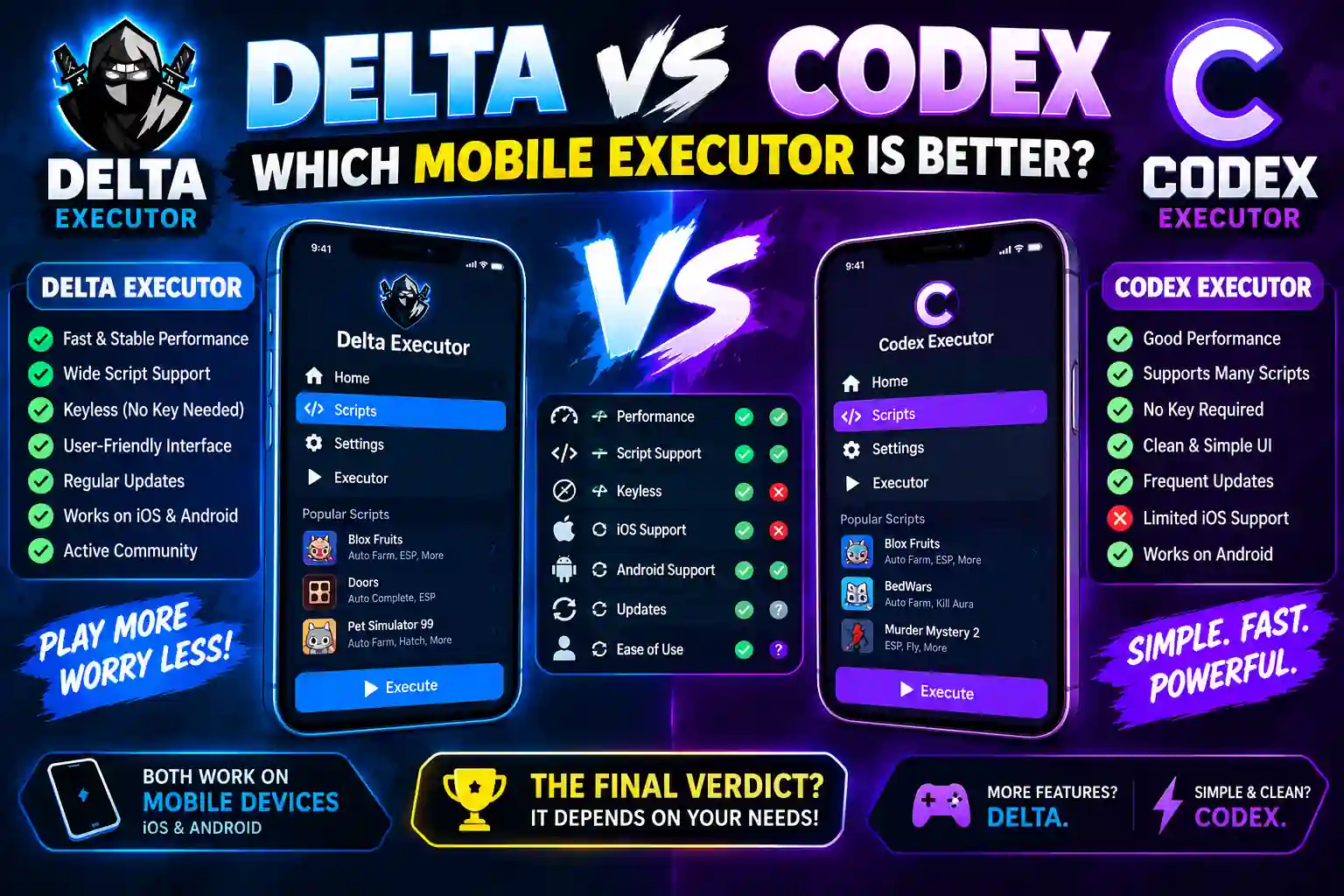
Delta vs Codex: Which Mobile Executor Is Better?
Delta and Codex are the two names you will see over and over in any Roblox mobile executor conversation . Both run on Android, both claim to run on iOS, both are free, and both market themselves as the smoothest mobile scripting experience available. But when you actually test them side by side across real games, real update cycles, and real post-patch recovery times, meaningful differences start to show. This head to head covers every angle a mobile user needs to make the right choice, from platform coverage and update speed to UNC scores, stability under long AFK sessions, and which executor actually keeps your scripts working after a Roblox patch.
What a Mobile Executor Actually Does
Before comparing Delta and Codex, it helps to be clear about what mobile executors actually do mechanically, because the design decisions each one makes flow directly from that mechanical reality.
On PC, a Roblox executor is a separate program that injects into the running Roblox process. On mobile, that approach is not possible because iOS and Android do not let one app inject into another. So mobile executors take a different route. They ship as a modified Roblox application. The executor code is bundled directly into a repackaged Roblox APK on Android or IPA on iOS. When you install the executor’s build, you are replacing the standard Roblox client with a modified version that includes script execution capability from the inside.
This architectural fact drives everything else that matters in a Delta vs Codex comparison. Both executors ship as repackaged Roblox clients. Both have to rebuild their package every time Roblox updates the base client, which happens roughly every one to two weeks. Both must bypass Roblox’s Hyperion anti-tamper system to prevent detection. The question of which is better comes down to how fast each team rebuilds after a Roblox patch, how reliable their scripts execute, and how clean the user experience is on your actual device.
Roblox pushes client updates every one to two weeks. Each update invalidates every mobile executor’s current build until the team rebuilds and reships the modified APK or IPA. This is why both Delta and Codex have periodic downtime windows. The question is not whether they go down, but which one comes back online faster.
Delta Executor at a Glance
Delta Executor is built by DeltaDevs and marketed from the ground up as a mobile-first Roblox executor. Its primary design priority is Android and iOS performance, with the Windows and macOS versions treated as secondary surfaces. Delta launched its iOS version on August 26, 2024 and has maintained near-continuous cross-platform coverage since.
What Delta Does Well
Delta is completely keyless. There are no linkvertise ad walls, no key verification steps, no waiting cycles. Install the executor, open it, attach, and run. This single design decision is why Delta became dominant in mobile communities. Competing executors with key systems lose users every time the ad wall adds friction.
Delta’s update cadence is the fastest in the mobile executor market. After a Roblox patch, Delta typically ships a working post-patch build within hours. Codex and most other mobile competitors take days. For users who care about staying functional during the first 24 to 48 hours after a Roblox update, Delta is the only reliable option.
The script hub is built into the app, giving users immediate access to popular scripts for games like Blox Fruits, Grow a Garden, Steal a Brainrot, 99 Nights in the Forest, and Steal an Egg without needing to source loadstrings from external sites. For every one of those games, our site maintains dedicated no key script guides at deltaexecutions.com.
Where Delta Shows Weaknesses
Delta’s rapid update cadence occasionally produces builds with lingering bugs. The team ships fast, which means early post-patch versions sometimes carry edge-case issues that take a follow-up patch to resolve. Also, because Delta is so widely used, fake download sites have proliferated across the web. Downloading from any source other than deltaexecutions.com carries real risk of malware or outdated builds without the current Hyperion bypass.
Codex Executor at a Glance
Codex Executor is a long-running mobile executor with nearly four years in the market. It is primarily Android focused with an iOS beta still in development as of late 2026. The Codex team collaborated with the Arceus X team on parts of the iOS build, which lends the project technical credibility within the mobile scripting community.
What Codex Does Well
Codex has a reputation for stability. The main Android build is tested for extended AFK sessions and holds up well across hours of continuous script execution. The GUI is clean, the auto-execute folder is reliable, and the syntax highlighter in the built-in editor is more polished than most competitors offer on mobile.
Codex supports major script hubs including Owl Hub and runs most ZekeHub scripts across 50 plus games. On well-known games the compatibility is near universal. Independent executor rankers measure Codex at approximately 96 percent on sUNC and 98 percent on UNC benchmarks, which is competitive with the top executors in the market.
The install process on Android is comparatively simple because Codex ships as a repackaged APK that replaces the normal Roblox app. One install, done.
Where Codex Shows Weaknesses
Codex uses a key system. Users must complete a key verification before each session, which typically involves clicking through link shortener ads. This friction is the single biggest reason users switch from Codex to Delta over time. Even casual users who do not mind the ads find the daily key renewal workflow frustrating after a few weeks of use.
The iOS version has been in beta for an extended period and is not yet reliably available. Users who want a cross-platform experience across Android and iOS cannot currently rely on Codex alone. The update speed after Roblox patches is also slower than Delta, with typical post-patch wait times of two to four days for a working Codex build.
Independent testers at WEAO flagged recent Codex builds as detected on the Android side, meaning Hyperion recognizes certain Codex signatures. Codex teams typically patch this within one to two update cycles but the detection window exposes users to higher ban risk during that period.
Platform Coverage: Where Each Executor Actually Runs
Platform support looks similar on paper but the real-world coverage differs significantly once you factor in which versions are actually stable.
| Platform | Delta Executor | Codex Executor |
|---|---|---|
| Android 8+ | Yes, stable | Yes, stable |
| iOS 14+ | Yes, stable since August 2024 | Beta only, limited availability |
| Windows 10 / 11 | Yes | Yes, listed as Windows 10 / 11 64-bit |
| macOS 11+ | Yes | Yes |
| Install Method on Android | Repackaged APK | Repackaged APK |
| Install Method on iOS | Sideloaded IPA via Sideloadly or AltStore | Sideloaded IPA, limited beta access |
| Cross-Device Sync | One account across platforms | Single-device install, no cross-sync |
If you only use Android, both executors give you a full working experience. If iOS matters to you at all, Delta is the clear choice because its iOS build has been production-stable for over two years while Codex iOS remains in beta.
Features Compared Side by Side
Both executors handle the core function of script execution well. The differences show up in the supporting features that affect everyday usability.
Keyless vs Key System
Delta is fully keyless. Codex uses a key system. This is the single biggest usability difference between the two. A keyless flow means you install, open, and script immediately. A key system means every session begins with a verification step, usually involving link shortener ads that take two to five minutes to complete. Over a month of regular use, the key friction adds up to hours of wasted time.
Script Hub
Both executors include a built-in script hub for popular games. Delta’s hub leans heavier on direct loadstrings and auto-executes, while Codex ships with more pre-configured game presets. In practice both cover the top 20 to 30 Roblox games well, and users who want specific scripts for games like Blox Fruits, Grow a Garden, Steal a Brainrot, 99 Nights in the Forest, or Steal an Egg can source them from any community source and paste directly.
Script Editor and Debugging
Codex has a slight edge here. Its built-in editor supports syntax highlighting that makes writing or editing scripts on mobile actually workable. Delta’s editor is more basic. For users who only paste existing loadstrings and never write their own code, this difference does not matter. For users who want to tweak scripts on their phone, Codex offers a more comfortable experience.
Auto-Execute
Both executors support auto-execute folders where scripts automatically run on game join. The implementations are roughly equivalent in reliability.
Multi-Account Switching
Codex allows switching between Roblox accounts within the app without logging out. Delta handles this through the standard Roblox app flow. For users who maintain multiple accounts for scripting versus main play, Codex has a small edge.
Game Preset Library
Codex ships with built-in presets for Da Hood, Jailbreak, Blox Fruits, and 2,500 plus games. Delta relies on its script hub and user-pasted loadstrings for the same functionality. Both approaches work. Codex’s preset system is more convenient for first-time users but less flexible for users who want to override defaults.
Update Speed After Roblox Patches
This is the single most important differentiator between Delta and Codex in actual practice.
Roblox ships client updates roughly every one to two weeks. Each update patches the Hyperion anti-tamper system or changes something in the client that breaks mobile executor builds. The question for any mobile executor is how long between the Roblox patch and the executor having a working post-patch build available.
Delta Update Cadence
Delta’s post-patch recovery time is typically a few hours. For major Roblox client updates, the Delta team has new builds ready within four to twelve hours after the patch goes live. For minor Hyperion patches, the turnaround is often under four hours. This is the fastest post-patch recovery of any mobile executor currently available.
Codex Update Cadence
Codex’s post-patch recovery time is typically two to four days. Users who rely on Codex regularly accept that they will have a downtime window after every Roblox update where their executor does not work. For casual users this is acceptable. For users who want continuous AFK farming or who have time-sensitive goals in events, this gap is a significant problem.
What Happens During the Gap
During the window between a Roblox patch and a Codex update, Codex users have three options: wait for the patch, switch temporarily to Delta, or try to use the old Codex build (which will not attach). Most Codex users end up installing Delta as a backup specifically for these windows. Many then never go back to Codex because the keyless Delta experience feels better.
An executor that works 95 percent of the time but is down during every post-patch window creates significant frustration. An executor that works 98 percent of the time with same-day post-patch recovery feels completely different in daily use. Update speed is the single most impactful quality metric for any mobile executor.
Stability and Crash Rate Under Real Conditions
Both executors run stable in the first few minutes of a session. Differences show up over extended AFK farming windows where auto-farm, auto-steal, or auto-raid scripts run for hours continuously.
Delta Stability
Delta’s crash rate on current builds is low across both Android and iOS. The executor handles multi-hour AFK sessions well on most devices. Occasional crashes do occur, particularly on lower-end Android devices with less than 4GB of RAM, but these are the exception rather than the rule. If Delta does crash during a session, our crash troubleshooting guide covers every common cause and fix.
Codex Stability
Codex’s main Android build is often cited as one of the most stable mobile executors in the market. Users consistently report multi-hour AFK sessions without crashes. On high-rebirth script sessions and in heavy games like Blox Fruits with Auto Farm active for extended periods, Codex often outperforms Delta slightly in raw session continuity.
Verdict on Stability
Codex has a modest edge in raw stability on Android. Delta’s stability is close enough that most users will not notice the difference, and Delta’s faster post-patch recovery usually makes it feel more stable overall even when individual session continuity numbers favor Codex. On iOS the comparison does not exist because Codex iOS is not stable enough to measure yet.
Performance on Low-End Devices
Mobile executors run on devices ranging from 2GB RAM budget Androids to flagship iPhones. Performance differences at the low end matter for users without premium hardware.
Delta on Low-End Android
Delta runs on Android 8.0 and up. On devices with 3 to 4GB of RAM, Delta performs well with most scripts active. On devices with 2GB of RAM, running intensive scripts like Fruit Sniper in Blox Fruits or large Brainrot Spawner loops in Steal a Brainrot can push the device to its limits and occasionally cause stutters or disconnects.
Codex on Low-End Android
Codex is specifically optimized for mobile and uses efficient resource management techniques to minimize load. On the same low-end hardware where Delta might stutter, Codex often runs noticeably smoother. For users on budget Android devices, Codex can be the better choice purely on performance grounds.
Verdict on Performance
For low-end Android devices with 2GB of RAM or less, Codex has a performance advantage. For mid-range and above devices, both executors perform similarly. On iPhone, Delta is the only real choice because Codex iOS is not production-ready.
Security and Detection Status
Both executors violate Roblox’s Terms of Service by their nature. Both carry account ban risk. The question is how each executor manages that risk and what their current detection status looks like.
Delta Detection Status
Delta is currently undetected at the executor level as of October 2026. The Hyperion bypass is active in the latest build. Behavioral ban risk still exists for aggressive script use regardless of executor, as we cover in detail in our guide to Delta detection and Error 267 and 268.
Codex Detection Status
Independent executor rankers at WEAO flagged recent Codex Android builds as detected in August 2026. The Codex team patches detection quickly but the lag between a detection event and a patch exposes users to higher risk during that period. Codex scores approximately 96 percent on sUNC and 98 percent on UNC benchmarks, which is comparable to Delta’s benchmark performance.
Download Source Security
Both executors are frequently cloned by fake sites distributing malware. Always download Delta exclusively from deltaexecutions.com and verify Codex downloads from its official source. Third-party APK sites are a leading cause of device infection in the mobile executor community.
Account Safety Recommendations
Regardless of which executor you choose, use a secondary account for all scripted sessions. Running scripts on your main account carries real risk of permanent account action. We recommend reading our complete guide to executor safety before any serious script use.
Install Process Compared
The install experience is one of the places where usability differences become immediately obvious.
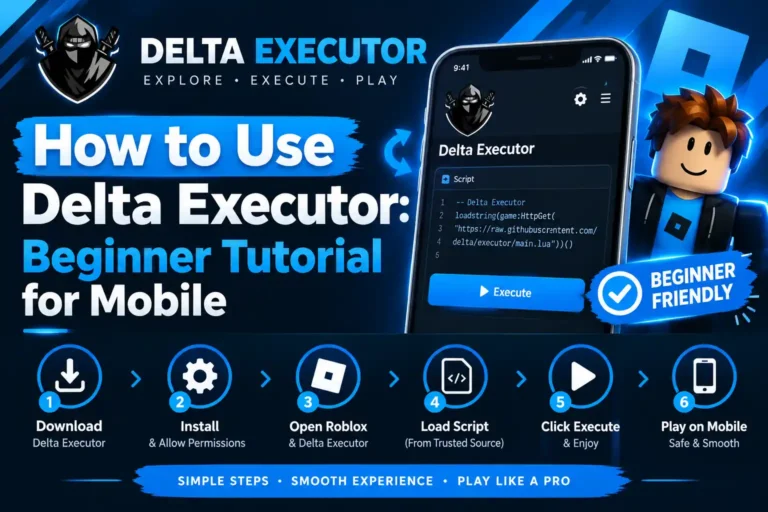
Delta Install Flow
- Download the official APK or IPA from deltaexecutions.com. Delta’s official site is the only verified source. Avoid third-party mirrors.
- Install the file on your device. On Android, enable installation from unknown sources when prompted. On iOS, sideload the IPA using Sideloadly or AltStore. The iOS direct install guide covers every step.
- Open Delta Executor. No key verification. No ad walls. Open and go.
- Launch Roblox from Delta or sideloaded alongside, then paste your loadstring and click Execute.
Codex Install Flow
- Download the Codex APK from the official Codex site. Same security precautions apply.
- Install the APK as a repackaged Roblox client. This replaces your normal Roblox app with the Codex-modified version.
- Open Codex and complete the key verification process. Click through the link shortener ads and copy the generated key back into the app. This typically takes two to five minutes.
- Join a game and paste your loadstring.
The time difference between Delta and Codex at install is small on the first install. Over a week of regular use, the Codex key verification process adds up to meaningful friction while Delta’s keyless flow stays frictionless from day one onward.
Delta vs Codex: Full Comparison Table
| Feature | Delta Executor | Codex Executor |
|---|---|---|
| Price | Free | Free |
| Keyless | Yes | No, uses key system |
| Android Support | Yes, Android 8.0+ | Yes, Android 8.0+ |
| iOS Support | Yes, stable since Aug 2024 | Beta only, limited |
| Windows Support | Yes | Yes (10/11 64-bit) |
| macOS Support | Yes | Yes |
| Update Cadence (Post-Patch) | Hours | Two to four days |
| Script Hub Built In | Yes | Yes, with game presets |
| Script Editor Quality | Basic | Syntax highlighting included |
| Auto-Execute Folder | Yes | Yes |
| Multi-Account Switching | Standard Roblox flow | Built in |
| UNC Score | ~98% | ~98% |
| sUNC Score | ~96% | ~96% |
| Detection Status (Oct 2026) | Undetected | Recently flagged, patched |
| Low-End Android Performance | Good | Excellent |
| Install Friction | Low (keyless) | Moderate (key verification) |
| Community Script Compatibility | Very High | Very High |
| Fake Site Problem | High (widely cloned) | Moderate |
Which Executor Should You Pick?
The honest answer is that it depends on your platform and your tolerance for the key system. Here is the decision framework.
Pick Delta if you want…
- A completely keyless experience with no ad walls at any step
- iOS support, because Delta iOS is production-stable while Codex iOS is still in beta
- The fastest possible post-patch recovery after Roblox updates
- Cross-platform consistency across Android, iOS, Windows, and macOS
- A built-in script hub covering every popular game out of the box
Pick Codex if you want…
- The absolute lowest resource footprint on budget Android devices with 2GB of RAM or less
- A built-in script editor with syntax highlighting for writing your own scripts on mobile
- Game preset libraries with 2,500 plus games pre-configured
- Multi-account switching inside the executor itself
- And you are willing to accept key verification friction and slower post-patch recovery in exchange
Our Final Recommendation
For the vast majority of mobile Roblox scripting users in 2026, Delta is the better overall choice. It wins on platform coverage, update speed, install friction, and iOS availability. Codex remains a strong secondary option and is particularly valuable as a backup during Delta downtime windows or for users on very low-end Android hardware.
The most practical approach for serious mobile scripters is to install both. Use Delta as your primary daily driver because of its keyless flow and fast update recovery. Keep Codex installed as a backup for the rare moments when Delta is down after a Roblox patch and you need an immediate alternative. This two-executor strategy gives you the maximum possible uptime across the year.
The Bottom Line
Delta Executor is the better mobile Roblox executor for most users in 2026. It is keyless, stable, available on both Android and iOS, and updates faster than any competitor after Roblox patches. Codex Executor is a strong backup option with particular strengths on low-end Android devices and in script editing, but its key system, slower update cadence, and limited iOS availability put it behind Delta for most users.
If you only pick one, pick Delta. If you want maximum uptime, install both and use Delta as your primary. Download Delta exclusively from deltaexecutions.com to avoid the fake sites that cluster around any popular mobile executor.
Frequently Asked Questions
Is Delta or Codex better for Roblox mobile scripting?
Delta is better for most users in 2026 because it is keyless, available on Android and iOS, and recovers from Roblox patches within hours. Codex is better for users on very low-end Android hardware and for users who want built-in syntax highlighting for writing their own scripts. For maximum uptime, use Delta as primary and keep Codex as a backup.
Does Codex work on iOS?
Codex iOS is in beta as of late 2026 and has limited availability. The Codex team is collaborating with the Arceus X team on the iOS build but it is not yet production stable. For reliable iOS scripting, Delta Executor is the only mobile executor with a mature iOS version, released in August 2024 and consistently updated since.
Is Delta Executor keyless and Codex not?
Yes. Delta is fully keyless. You install, open, attach, and script immediately with no verification step. Codex uses a key system that requires completing link shortener ads before each session, typically taking two to five minutes. This friction is the single biggest reason users switch from Codex to Delta over time.
Which executor updates faster after a Roblox patch?
Delta updates significantly faster. Post-patch recovery for Delta is typically a few hours. For Codex it is typically two to four days. Users who care about continuous AFK farming or time-sensitive events should prioritize Delta for this reason alone, since every Roblox patch creates a downtime window and Delta’s window is dramatically shorter.
Are Delta and Codex safe to use?
Both violate Roblox’s Terms of Service and both carry account ban risk. Delta is currently undetected at the executor level in October 2026. Codex has been flagged as detected in some recent builds but patches these issues within one to two update cycles. For account safety, always use a secondary account for scripted sessions regardless of which executor you choose, and only download from official sources.
Can I use Delta and Codex at the same time?
You can install both on the same device but you can only run one Roblox client at a time. Each executor ships as a modified Roblox APK or IPA that replaces the normal client, so switching between them means switching installations. Most mobile scripters install Delta as their primary and keep Codex installed as a backup for use during Delta downtime windows after Roblox patches.
Which is better for low-end Android devices?
Codex has a performance edge on budget Android devices with 2GB of RAM or less. Its efficient resource management often produces smoother operation than Delta on constrained hardware. On mid-range and higher Android devices, both executors perform similarly and Delta’s other advantages make it the better overall choice.
Why do mobile executors keep breaking?
Roblox patches its client every one to two weeks. Each patch typically updates the Hyperion anti-tamper system in ways that invalidate every mobile executor’s current build. Executors have to rebuild and redistribute a new modified APK or IPA after each patch. This is unavoidable with the current mobile executor architecture. The right question is not whether an executor breaks after a Roblox patch but how fast it comes back online. Delta is the fastest at this recovery process in 2026.
References
- DeltaExecutions, Delta Executor Official Download and Version Changelog, deltaexecutions.com
- AxeeTech: Best Roblox Executor for iOS in 2026, Top 7 Ranked
- ZekeHub Executors: Codex Executor Live Status and UNC Benchmarks
- Codex Executor Official Site, Version 2.738 Release Notes and Platform Documentation
- WEAO Executor Rankings, Detection Status Tracking for Mobile Executors



2 Comments